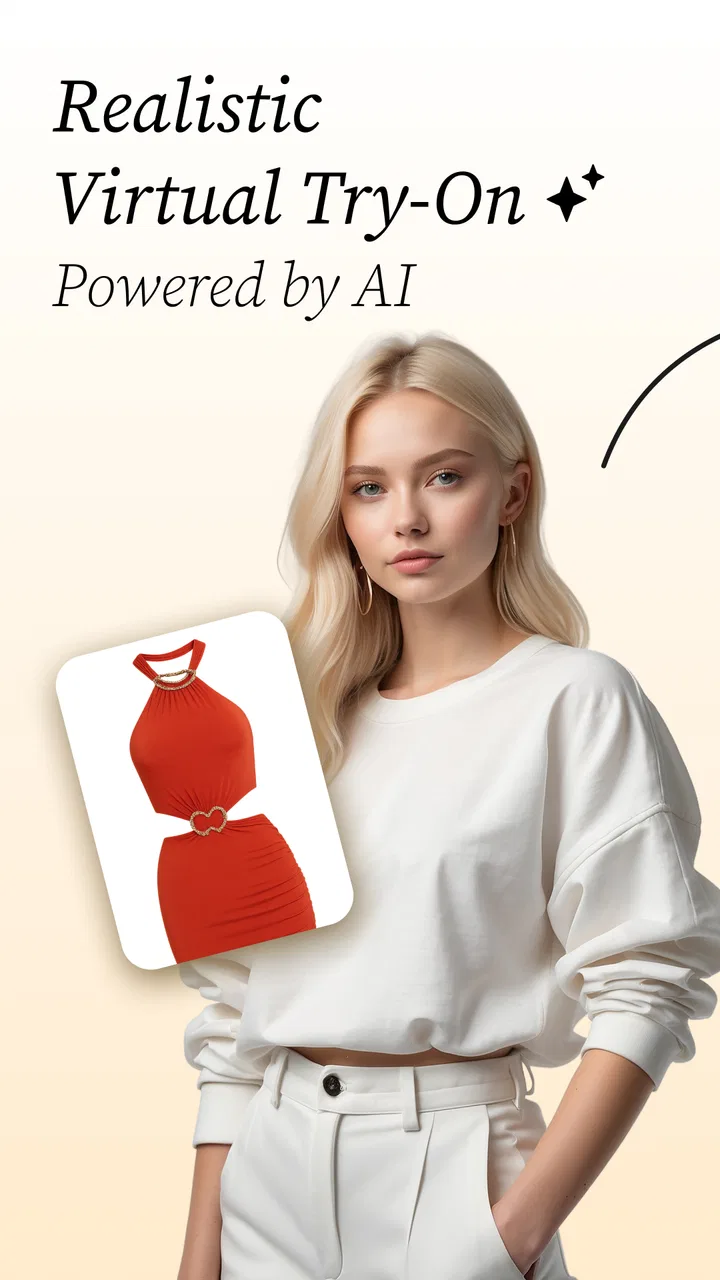
AI Stylist - Outfit Maker App
- 4.4
- Rating
- 10.00K
- Installs
- Free
- Price

 Analysis by App-foxy
I tested AI Stylist - Outfit Maker App as a beauty app with a simple question in mind: can it make getting dressed easier when several people in a home are trying to plan outfits, share ideas, or make better use of clothes they already own? My answer is cautiously positive. The concept is useful, especially for visual planning, but it works best when each person treats it as a personal styling workspace rather than a fully shared household wardrobe.
The app comes from LeoStudio Global Ltd. and is free to install, which makes it easy to try without committing money at the start. It has an average rating of 4.4 from around 765 ratings and has passed the 10K-install mark. Those figures suggest that it has found an audience, although the relatively small number of written reviews means I would rely more on my own experience than on the rating alone.
How the app fits into everyday household styling
The most natural use is a quick outfit decision before work, school, travel, or a social event. Instead of pulling several shirts and trousers from a wardrobe and changing repeatedly, I can use the app as a visual place to think through combinations. That is particularly handy when I know I have suitable clothes but cannot see an obvious way to put them together.
You May Also Like

 AccuWeather: Weather Radar
AccuWeather Review: A Quick, Clear Forecast for Everyday Decisions
For everyday plans, the best forecast is the one you can understand quickly. AccuWeather makes rain timing, radar, and local conditions easy to act on, with a few trade-offs.

 Hill Climb Racing
Why Hill Climb Racing Still Turns Crashes Into One More Run
A tiny car, a bumpy hill and one more upgrade: Hill Climb Racing keeps resurfacing because its simple chaos makes every near-miss feel personal.

 AliExpress - Shopping App
AliExpress Makes Global Shopping Feel Personal, but Shoppers Bear the Risk
AliExpress turns a global marketplace into a pocket-sized discovery engine. Its reach is useful, its shopping loop compelling, and its trade-offs easy to miss.

 Lords Mobile: Kingdom Wars
Lords Mobile Is a Kingdom-Building Routine, Not a Quick Match
A case-by-case verdict on the building, battles, device demands, and social commitments that make Lords Mobile rewarding for some players and exhausting for others.

 PDF Scanner app - TapScanner
TapScanner Makes Paperwork Easier to Capture, Check, and Share
TapScanner makes scanning with a phone feel less like a rescue operation and more like a dependable step in getting work done. Its capture tools are useful, though not flawless.

 Block Blast!
 Shows How Much a Puzzle Game Can Leave Out
A quiet grid game shows why puzzle players increasingly value instant clarity, repeatable skill and low-pressure play—and where the genre still needs to catch up.
More From Our News Desk
View All News


A shared-device situation makes the idea more interesting. Imagine two adults in the same home preparing for a weekend gathering. One person wants a relaxed look, while the other needs something slightly smarter. Passing a phone back and forth can help compare ideas, but it also exposes the main practical boundary: a virtual closet is personal by nature. If everyone uses the same device, it is important to keep track of whose clothing images and outfit ideas are currently being viewed.
I would not treat the app as a household inventory unless I had personally checked how its storage and account behavior worked on my device. The useful assumption is narrower: it can support conversation and visual planning, but it should not replace clear ownership of clothing photos, preferences, or saved styling work. That distinction prevents a shared phone from becoming a confusing mixture of several wardrobes.
For a single user, the workflow is easier. I can focus on my own colors, proportions, comfort preferences, and regular occasions. For a couple or family, the app is still useful, but coordination needs to happen outside the styling screen as well. A simple habit such as saying whose outfit is being reviewed before making changes can avoid accidental edits or misunderstandings.
What the AI approach adds
The appeal is not just having a digital list of clothes. The app is built around the idea of using artificial intelligence to help form outfits, so its value comes from reducing the blank-page problem. When I am staring at separate items and cannot imagine them together, an AI-assisted suggestion can give me a starting point that I might not have considered.
That does not mean every suggestion should be accepted automatically. Styling is personal, and an image-based recommendation may not understand that a fabric feels uncomfortable, a cut is too loose for a particular task, or a color looks different under indoor lighting. I found the best mental model was “creative assistant,” not “final authority.” The app can prompt an idea; I still decide whether the outfit works in real life.
One useful technique is to judge suggestions by one variable at a time. First look at the overall color relationship. Then consider whether the pieces suit the same level of formality. Finally check practical details such as weather, movement, and footwear. This prevents a visually attractive combination from being mistaken for a genuinely wearable one.
Another worthwhile habit is to use the app when planning several outfits together, rather than only asking for one look in a hurry. A small rotation for the week can reveal that the same jacket works with multiple bottoms, or that a rarely worn item has more potential than expected. That makes the tool more valuable than a one-off novelty because it supports decision-making across several days.
Keeping separate people and wardrobes clear
Shared use is where I would be most careful. If a household has one phone or tablet, I would decide in advance whether the app is being used for one person at a time or as a discussion tool. Without that boundary, one person’s clothing can easily become mixed with another person’s choices, especially when photos are added quickly.
I would also avoid assuming that a shared device means shared permission. A teenager may be happy to ask for outfit ideas but may not want every personal image or style experiment visible to siblings. An adult may want to plan work clothing privately. The app can be part of a conversation, but privacy expectations still need to be handled by the people using it.
A practical routine is to review the screen before handing the device to someone else. Close the current styling session, remove any photo that should not be casually shown, and state what the next person is looking at. This is not a special app feature; it is simply good shared-device etiquette, and it matters more when the content relates to personal appearance.
I would also keep the app’s role distinct from a family shopping list. If one person decides that a missing basic item would complete several outfits, write that down separately. That way, the styling exercise remains about combinations rather than turning every suggestion into a purchase. It is an important trade-off because AI recommendations can make new clothing seem like the answer when better use of existing pieces may be enough.
Setup, expectations, and the first useful test
The app is free, so the initial barrier is low. It is suitable for Everyone, and it runs on devices using Android 8.0 or newer. That broad compatibility makes it approachable for households with an older spare phone, although the actual comfort of using it will still depend on the device’s screen, camera, and general performance.
I recommend beginning with a small, representative selection rather than trying to document an entire wardrobe immediately. Choose a few frequently worn tops, bottoms, layers, and shoes. This gives the AI a manageable starting point and lets you judge whether the resulting combinations match your taste before investing time in a larger catalog.
There is a hidden efficiency benefit to this approach. A carefully chosen starter set reveals whether the app helps with your real clothing habits. If your wardrobe is mostly casual basics, you can see whether it creates useful variation. If your clothes are strongly seasonal, you can test whether the suggestions make sense for the current weather. Adding everything at once may feel thorough, but it makes it harder to identify what is actually improving your routine.
When using a shared device, I would create a simple naming convention in my own notes, such as identifying whose clothing is being discussed and what occasion the outfit is for. I would not depend on memory after several sessions. This small step is especially helpful when one person is planning an office look and another is considering a relaxed weekend outfit.
The app includes in-app purchases ranging from $2.99 to $69.99 per item. Since the app is free to install, I would explore the basic experience first and only consider paying after understanding which part of the workflow is genuinely useful. In a household, that decision should be made by the person responsible for the device or payment method, not assumed by everyone who happens to use it.
That price range also changes how I judge the app. A free experiment can be worthwhile even if it only helps occasionally. A paid upgrade needs a clearer benefit, such as saving meaningful time or making outfit planning consistently easier. I would be especially cautious about paying simply because an AI suggestion looks impressive once. Repeated usefulness matters more than a single attractive result.
Coordination without turning style into an argument
Outfit planning can become surprisingly subjective in a household. One person may value comfort, another may care about matching colors, and a child may simply want to wear a favorite item. The app is most helpful when it provides options rather than presenting one look as objectively correct.
I found that asking focused questions leads to better discussions than asking whether an outfit is “good.” Is it suitable for the occasion? Can the wearer move comfortably? Does it work with the shoes already available? Would a different layer make it practical outdoors? These questions turn the app into a planning aid instead of a judge.
A concrete use case is a family trip with limited luggage. Each person can think through combinations before packing, while the household discusses which layers can be reused across several days. The app cannot make personal decisions for everyone, but it can make the visual comparison quicker. The trade-off is that a shared packing plan still needs human coordination; an attractive digital outfit is not automatically a sensible suitcase.
Another use is helping someone who is rebuilding a routine after a wardrobe change. Perhaps a person has moved from casual study clothes to office clothing, or simply wants to stop wearing the same two combinations. The AI can provide prompts while the user learns what feels appropriate. In that situation, I would save mental notes about why a suggestion worked or failed, because personal feedback is more valuable than repeatedly accepting random combinations.
For children and teenagers, I would keep an adult involved when the app is used on a shared family device. The Everyone age rating makes the app broadly accessible, but an age label does not settle questions about personal images, confidence, or household privacy. A young user may need reassurance that a suggestion is optional and that appearance is not a measure of worth.
Trust, age, and personal images
Beauty apps can feel harmless because the output is about clothing, but users still need to think about what they upload and who can see it. I would only add images that I am comfortable using in the app’s styling workflow, and I would avoid treating an AI-generated look as a precise representation of how a garment will fit my body.
This matters even more for a shared phone. Before using the app with another family member, I would explain whose images are on screen and give that person a chance to decide whether they want to continue. For younger users, an adult should guide that choice. The app can support outfit creativity, but it should not become a source of pressure, comparison, or unsolicited criticism.
I also would not use it as a substitute for professional advice about uniforms, protective clothing, or accessibility needs. If someone requires a particular fit, fabric, fastener, or level of coverage, real-world comfort and safety take priority over a visually appealing recommendation. This is one of the clearest situations where a conventional checklist or direct conversation is better than AI styling.
Trust also includes knowing when to ignore the output. If a suggestion conflicts with the wearer’s identity, cultural expectations, workplace rules, weather, or comfort, it is simply the wrong suggestion for that moment. The app is strongest when it expands possibilities without taking control away from the person wearing the clothes.
Where it beats ordinary alternatives—and where it does not
The usual alternative is a mirror, a physical wardrobe, and personal trial and error. That method remains better for checking fit, texture, movement, and how an outfit looks under the actual light where it will be worn. No virtual suggestion can fully replace putting on the clothes.
On the other hand, the app is more convenient when the problem is mental organization. A mirror shows one combination at a time, while an AI stylist can help me think beyond the first pairing that comes to mind. It is also more useful than a basic notes app for visual outfit planning, because text labels alone do not make color and silhouette relationships obvious.
A standard fashion inspiration feed may offer more variety, but it can also encourage comparison with clothes, bodies, and budgets that have little connection to my own life. This app’s strongest potential is more grounded: start with what I actually have, then explore combinations around it. That makes it a better fit for reducing wardrobe repetition than for chasing runway-style inspiration.
Still, a manual wardrobe spreadsheet may be preferable for someone who wants strict inventory control, purchase tracking, laundry planning, or detailed packing lists. I would also choose a simple photo folder if I only needed to remember where individual garments are. The AI styling angle is worthwhile only when suggestions and visual experimentation solve a real problem.
Who should use it and who should skip it
I would recommend trying it if you regularly waste time deciding what to wear, own more clothes than you use, or enjoy experimenting with combinations but need a prompt to get started. It is also a reasonable option for a household that wants to discuss outfits together while keeping expectations realistic about personal boundaries.
It is less suitable for someone who wants exact fit advice, a complete closet-management system, or a guaranteed answer for formal dress codes. It may also frustrate users who dislike photographing clothing or who prefer tactile decisions in front of a mirror. In those cases, a physical try-on routine or a simple personal catalog may be more efficient.
I would skip paid extras until the free experience proves useful over several real occasions. The app’s current version is 1.2.3, so I would keep expectations measured and judge it by practical results rather than assuming that every AI feature will understand individual taste immediately. A good test is whether it helps me leave the house faster or wear something I had been ignoring.
My household verdict
After using it as a beauty and outfit-planning tool, I see the most value in its ability to break indecision. It can turn a pile of familiar clothes into a set of possibilities, and that is genuinely helpful when I am stuck. The best results come from starting small, checking every suggestion against comfort and context, and treating the AI as a source of ideas rather than a stylist with the final say.
For shared use, I would recommend clear boundaries: one person’s wardrobe at a time, an explicit handoff on a shared device, and adult guidance for younger users. Those habits are more important than any styling trick because clothing images and personal preferences should not be treated as communal by default.
My honest recommendation is to try the free version as a personal planning assistant first. If it helps with several ordinary mornings, a trip, or a household outfit discussion, it has earned a place in the routine. If it produces attractive but impractical combinations, or if the family needs detailed inventory and privacy separation, a manual system will be the better choice. For the right user, this AI Stylist is a useful nudge toward more deliberate dressing, not a replacement for judgment, fit, or respectful coordination.
FAQs for AI Stylist - Outfit Maker App
01What is AI Stylist - Outfit Maker App and how does it work?
AI Stylist - Outfit Maker App is a fashion-forward application designed to help users create stylish outfits using AI technology. The app analyzes your wardrobe through photos, suggests outfit combinations, and provides fashion advice tailored to your personal style. It’s like having a personal stylist in your pocket, making fashion decisions easier and more fun.
02Is AI Stylist - Outfit Maker App free to use?
The app offers a free version with basic features, allowing users to explore outfit suggestions and style tips. However, there is also a premium subscription available, unlocking advanced functionalities such as personalized styling sessions, exclusive fashion content, and ad-free browsing. Pricing details can be found within the app store.
03What devices are compatible with AI Stylist - Outfit Maker App?
AI Stylist - Outfit Maker App is available for both Android and iOS devices. It requires Android version 6.0 and above or iOS 12.0 or later. The app is optimized for smartphones, ensuring that users get the best experience on their handheld devices. Check your device compatibility before downloading.
04How secure is my personal data on AI Stylist - Outfit Maker App?
User privacy is a top priority for the developers of AI Stylist. The app adheres to strict data protection regulations, ensuring that your personal information and photos are securely stored and not shared without consent. Review the app’s privacy policy for detailed information on data handling practices.
05Can I use AI Stylist - Outfit Maker App without an internet connection?
While some basic features such as viewing saved outfits can be accessed offline, most functionalities of AI Stylist - Outfit Maker App, like accessing the latest fashion trends or receiving AI-generated outfit suggestions, require an internet connection. It’s recommended to be connected online for a full experience.
Pros
- User-friendly interface with intuitive design.
- Wide variety of style options to explore.
- AI recommendations improve over time.
- Easily integrates with social media platforms.
- Regular updates with new fashion trends.
Cons
- Requires stable internet for optimal performance.
- Limited offline functionality available.
- Subscription needed for premium features.
- Occasional delays in AI outfit suggestions.
- Some users report occasional app crashes.

AI Stylist - Outfit Maker App
Gallery